Showing posts with label Videos. Show all posts

Thursday, January 24, 2013

Nokia Lumia 955 is Based on Nvidia Tegra 4, Has 2 GB of RAM, 5.5 inch Display

Deviantart user nik255 recently submitted to
us the Nokia Lumia 955 concept, that’s
supposed to be a “Windows PRT” device, supposedly the next Windows for ARM version being on boar. The idea is that instead of Windows Phone and Windows RT you get Windows PRT, a combo of them.
The OS brings higher resolutions, digital ink feature, more tile sizes and an integrated desktop environment. The latter will allow the user to rely on the phone/tablet as a computer and run apps in the classic windows mode, with display, keyboard and mouse, plus customization options.
Nokia Lumia 955 is Based on Nvidia Tegra 4, Has 2 GB of RAM, 5.5 inch Display
The Nokia Lumia 955 concept packs an Nvidia Tegra 4 processor, 2 GB of RAM, a 5.5 inch PureMotion HD++ display, with 1920 x 1080 pixel resolution and a 3.600 mAh rechargeable battery. There’s also microSDXC on board, USB 3.0, a Mini DisplayPort (Video), WiFi and Bluetooth 4.0. At the back we’ve got a 16 megapixel PureView camera and the device comes in 16 GB, 32 GB and 64 GB versions. The digital ink stylus feature will allow you to take notes, as shown in the picture above.

Last Nokia Lumia 950

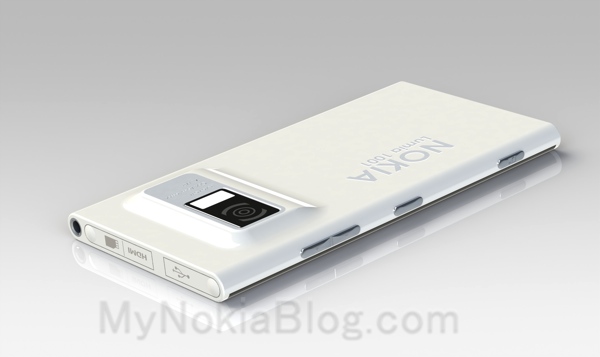
Nokia Lumia 1001 Pureview Features 41 MP Camera, Dual Core CPU, WP8

Nokia Lumia 1001 Pureview Features 41 MP Camera, Dual Core CPU, WP8The folks of Mynokiablog have published a very interesting Nokia Lumia concept, that uses a Pureview camera, an idea that has been long time speculated in the media. Meet the Nokia Lumia 1001 Pureview mockup, created by Mkrtchyan Edgar using SolidWorks. This looks like quite a polished phone, a viable one with Windows Phone 8 on board.

We’re dealing with a dual core Nokia here, one with a 1.6 GHz processor, a 4.3 inch 1280 x 768 pixel display based on AMOLED ClearBlack technology. At the back we have a 41 megapixel Pureview camera with Full HD capture and Xenon flash. Under the hood there’s a 2200 mAh battery, certainly more powerful than the one on the Nokia Lumia 808 PureView. The design borrows a few elements from the Lumia 800/N9, but it slims up the package, I guess. Nokia Lumia 1001 Pureview also has a HDMI port, DLNA, 1.3MP front camera and NFC.
It comes in 16 and 32GB versions, with a microSD card slot and a chassis that should be around 9mm thick. It weighs 160 grams and it adopts the monoblock polycarbonate casing. In the humped area of the phone with the camera it may reach a thickness of 12mm, so that’s that sacrifice you have to make for a Pureview camera. I think the Nokia Lumia 1001 looks better than the 808 Pureview. Do you?

Videos

Nokia Lumia Windows Phone with 41 Megapixel Camera Coming Soon

According to the Rumors Nokia is going to
launch another model of Lumia Windows Phone Series  with 41
Megapixel Camera this year. We hae seen 41 MP camera in Nokia's Pureview 808 Phone. So, this news could very likely be true.
nokia lumia 11
Now here’s a new rumor that I really, reaaalllyy hope is true. Apparently Nokia is going to launch a Lumia Windows Phone sometime this year with the same 41 Megapixel camera as the Nokia 808 PureView.When the first PureView device, the Nokia 808 PureView was announced it was rumored that the first Windows Phone running device with similar tech inside it won’t be announced anytime soon.
Fast forward to 2013 and we have the first rumors of Nokia EOS which is said to be the codename for a Lumia device equipped with a sensor similar to the Nokia 808. The Verge reports that the handset codenamed EOS will be pitched as a high end Lumia handset and will be built using Aluminum instead of the polycarbonate found on the latest range of Windows Phone devices.
The 41 MP sensor on the smartphone will enable oversampling and lossless zoom as seen on the 808. This is to be quite different from the PureView implementation seen on the Lumia 920 which features OIS (Optical Image Stabilization) for jerk free video recording. The inbuilt OIS also enables improved low light photographs. There have been some rumors that suggest that PureView phase 3 technology might be a combination of the oversampling and optical image stabilization but this remains to be seen.
The handset might be showcased during MWC next month alongside a Lumia 920 replacement called the Catwalk which will also feature an aluminum body. I really, reaaaalllllyyyy hope this one is true. And that Nokia Windows Tablet rumor as well.
Looks like it’s going to be an interesting year, eh?


nokia lumia 41mp


Topic Khmer

Wednesday, January 23, 2013

Microsoft Surface Pro Shipping February 9th In U.S. And Canada For $899

If you have been hoping to pick up a Microsoft Surface Pro this month as
your late Christmas present, you may be disappointed, since the shipping date has been pushed back slightly, to February 9th, in both the United States and Canada, along with several accessories to please anybody’s ‘wants’ and ‘needs’.
The Surface Pro is the high-end edition of the Microsoft Surface, sporting Windows 8 Pro (unlike the Surface RT which comes bundled with Windows RT), and will be available in two models: a 64GB version for $899 and a 128GB model for $999, if you have more music, pictures and video files to store, or are just a power user who regularly runs lots of programs. Both of these drives are solid state, therefore these machines should be able to boot Windows 8 in a matter of seconds, making the Surface perfect for those on-the-go-users who are looking for a great mobile and slimmed-down working environment.
3286.Surface_Pro
On February 9th as well, Microsoft intends to ship several accessories for both Surfaces, starting with an external Touch Cover, a screen cover that converts into a keyboard, which already ships by default with the Surface RT. For stylish users, the Redmond company is also releasing the Touch Cover Limited Edition, featuring unique laser-etched designs in several distinct colors. These are, however, quite expensive, selling for $129.99 in the United States and in several other countries shortly, although Microsoft hasn’t detailed which markets it intends to reach with this stylish – albeit expensive – product.
8512.Surface_031_typecover_6489B5D8
For customers wishing to purchase a Surface RT, Microsoft is also making available, on February 9th, a standalone version without the Touch Cover keyboard, allowing users to choose other forms of input if they wish, such as a Type Cover, which features physical keys instead of a touch keyboard.
3817.Surface_095_66C63E94
Microsoft promises more announcements soon as the February 9th launch date approaches, although little is known about what might be unveiled:
“We’re extremely excited to share more about Surface Windows 8 Pro and the growing Surface family of products. We’ll have additional information as we get closer to Feb. 9.”


NEC Medias W Android Smartphone With Dual 4.3 Inch Displays Announced


NTT DoCoMo and NEC aren’t
ready to give up on the idea of folding, dual-screen smartphones just
yet. As part of the new line-up for spring 2013, the two have


teamed up to offer the Medias W, which features a 4.3-inch 540 x 960 resolution display on both the front and back of the phone. It follows in the proud tradition of devices like the Kyocera Echo and Sony Tablet P. That’s not to say the Medias W will end up as an eBay tchochke, too, but it’s going to be a tough sell.
The rest of the phone isn’t quite so out-of-this-world. It does at least double up on processing cores with its 1.5GHz powerplant, though NEC has opted for just 1GB of RAM at a time where most top-notch smartphones have moved up to two gigs. The Medias W does have a decent 16GB of internal storage, and there’s a micro SD expansion slot for bringing along even more of your favorite music, movies, and pictures.
There’s a front-facing camera and an 8MP rear-facing (at least when the Medias W is folded shut) shooter. Unlike most smartphones in this class that are built for the Japanese market, the Medias W doesn’t feature support for NFC or digital TV. The latter seems like a particularly strange omission, but perhaps NEC didn’t think consumers would be interested in watching TV on a 5-inch display that had a big black line down the middle.
But like the Tablet P and Echo, the Medias W can do just that. Its dual-display setup allows a single app to run stretched across both screens, or two apps to be run side-by-side. It still seems like little more than a novelty, and it’s hard to imagine the Medias W not fading off into obscurity.

Tuesday, January 22, 2013

Verizon Sold 6.2 Million iPhones In Quarter 4

Apple are going to be announcing their financial results tomorrow and we will find out just how many iPhone’s the company sold in
their last quarter, although Verizon have just announced their latest quarter results and in the results was the news that they sold 6.2 million iPhones in quarter 4 of 2012.
Verizon ended up selling a total of 9.8 million smartphones in quarter four, and whilst 6.2 million of these were iPhones, we also get some details on Android devices, Verizon sold a total of 3.6 million Android smartphones in quarter four.
iPhone 4
Out of the 9.8 million smartphones that Verizon activated, 30 percent of these handsets were to new customers and they also announced that nearly 90 percent of their contract sales were for
 smartphones.

iPad 5 Design Leaked by Foxconn Staffer – Report

Apple’s next major iPad upgrade will adopt design elements akin to the diminutive iPad mini released in October 2012, according to
a Chinese source citing a Foxconn employee.

Customers have responded extremely well to the diminutive tablet computer, and Apple now seems poised to implement some of its benefits on the larger iPads.

The fifth-generation iPad has already been rumored to adopt a thinner bezel and sloping edges much like the smaller iPad mini.


An insider from Hon Hai Precision Industry (which owns Foxconn) is now spilling the beans on Apple’s chosen design for the iPad 5, as the media refers to it.

Originally quoted by My Drivers (a Chinese IT site), this Hon Hai insider is reportedly a Foxconn employee. Foxconn assembles most of Apple’s portable gadgets, including the iPhone and the iPad.


Patently Apple cites the source as saying that “the iPad 5 is to sport a new design that will adopt narrow bezels and chamfered edge corners. The end result will have the new iPad 5, code named ‘sapoxx,’ look more like a magnified iPad mini.”


If the rumors are true, Apple could have the fifth-generation iPad ready for us this spring.

The Cupertino mammoth seems to have accelerated the refresh cycle of its tablet computers, likely in response to demand, as well as the competition.


The same thing is reportedly about to happen on the smartphone front. Up until this week, Apple was rumored to plan the launch of two new iPhone models. Many analysts believe one of them will be a low-end phone that everyone can afford.

On Monday, however, reports started to emerge that Apple was actually planning to launch three new iPhones in 2013, one of which is dubbed “Math.”

Like others, we believe there’a a good chance the rumor is fabricated, and that includes the name of the alleged 4.8-inch handset – “iPhone Math.” Videos of ipad 5

Review Gigabyte U2442N Notebook

It has been a while since we tested a Gigabyte model. The Taiwanese manufacturer is famous for its motherboards and peripheral devices. Gigabyte also offers a small selection of tablets and notebooks.

The Ultrabook creator, Intel, prophesised a boom in the Ultrabook market in the near future and many manufacturers, including Gigabyte are investing in this area. The new Gigabyte U2442 is a second generation Ultrabook which runs on the Ivy Bridge architecture.
The U2442 series has a 14-inch display, and places alongside Ultrabooks like the HP Envy 14 Spectre and the Acer Aspire Timeline Ultra M3. The notebook is not equipped with ULV components, but with a fast Core i5-3210M and the middle-class GeForce GT 640M graphics card. Officially, the U2442N cannot qualify as an Ultrabook with this hardware and only its sibling, the U2442V (identically equipped but with a ULV CPU - Core i7-3517U) can wear the title.
The rest of the hardware is similarly potent: 8 GB RAM, a 128 GB SSD and a 750 GB hard disk. This hardware is top class, which brings us to the price: (starts at) 1200 Euro (~$1555) for the U2442N. Other Ultrabooks are similarly expensive, so we will see what the test model can do in the following review.

Case

Smooth hinges
Smooth hinges
Made in Taiwan - the manufacturer is quite proud of this fact as can be seen by the large sticker on the top right of the screen. Our first impression is neutral: the silver-grey case is made of synthetic material and aluminum, yet it does not look as flashy as most competitors and may even be slightly drab. Thankfully, this is very practical as dust and smudges would be far more visible on darker (and even high-polished) cases.
The bottom of the laptop is made of only plastic, yet it offers good sturdiness. The chassis bends slightly under the keyboard when excessive force is applied. With the exception of this, the test model is as sturdy as a laptop with a metal chassis. This is especially impressive as the U2442N is a mere 21 mm thick and weighs 1.69 kilograms/3.72 lb. (and without the HDD - a mere 1.59 kilograms/3.5 lb.). Overall, the test model is very mobile. However, if the display bezel was thinner (between 1.5 and 2.7 cm), the mobility could be increased further.
The back of the display is made of polished aluminum, as promised by the manufacturer. This ensures that the display is quite sturdy. Thanks to the well-designed hinges, the laptop can be opened with one hand. On the other hand, when the laptop shakes, the display wobbles. We did not find any workmanship flaws like sharp edges, which results in the Gigabyte U2442 receiving a good score in this section.
to top

Connectivity

Like many other notebooks of 2012, the Gigabyte U2442N has two USB 3.0 interfaces. In addition, the laptop offers two USB 2.0 ports and this should satisfy most users. It is a real pity that the test model lacks a (Mini-) DisplayPort interface, but the user is provided with both a VGA and a HDMI interface.
The test model has no optical drive, ensuring that all ports have sufficient space on the case. The layout chosen by Gigabyte is well thought out and practical: Gigabit-LAN, the power outlet and both display interfaces are placed towards the back of the case, whereas the USB ports (two on the left, two on the right) and audio jacks are placed towards the front. All the interfaces and the card reader, which can only read SD cards, can be used without issues.
Front side: no ports
Left side: GBit-LAN, VGA, 2x USB 2.0, Microphone, Headphones, Kensington Lock
Back: no ports
Back: no ports
Right side: SD card reader, 2x USB 3.0, HDMI, Power outlet
1.3 megapixel webcam

Communication

The Intel Centrino Wireless-N 2230 is a mini PCIe WLAN module, which offers features and performance appropriate for a middle-class device. The Multi-Stream technology (2x2) makes it possible to transmit and receive up to 300 MB/s, but only on the usually overcrowded 2.4 frequency. The model does not support the 5 GHz frequency which means that users are limited to just one band on IEEE 802.11b/g/n networks.
The U2442N also has Bluetooth 4.0 (provided by the same module). This new standard of the wireless technology has a special Low-Energy mode and is supported by many modern Smartphones.
As usual, a small 1.3 megapixels webcam is installed in the display bezel. It may not take sharp pictures but it suffices for use with Skype or similar programs. The integrated microphone is of similar quality, and, in most cases, the user will not require an additional microphone.

Accessories

We did not expect this: the manufacturer offers a typical delivery (manuals and a driver CD) and includes a stylish leather bag. Although the material is not very high-quality, most users will be happy about this small extra which ensures more protection for their device.
The software extras are scarce. Thankfully, this means that the user will not have to uninstall unnecessary test versions. The obligatory Adobe Reader and Starter edition of Microsoft Office 2010 are pre-installed and can be accessed via desktop shortcuts.

Maintenance

Few upgrade possibilities are a characteristic of compact notebooks. This applies to our test model as well. The bottom of the model has a flap, which is secured by a single screw, and covers both RAM slots. These slots are already occupied and upgrading to 12 or 16 GB is only possible after removing the installed modules. All additional components, including the integrated battery, cannot be removed easily.

Warranty

Gigabyte promises 2 years global warranty for the U2442N. If the laptop should break down in a foreign country, the user can get it repaired on-site at a  Gigabyte shop. We could not find any information or offers pertaining to an extension of the warranty.
to top

Input Devices

Keyboard

The chiclet keyboard is installed nicely, if not perfectly, in the chassis of the test model. The workmanship and sturdiness are very good and it did not bend much even under immense force. We did not appreciate the cheap quality of the material of which the 15x15 millimeter keys are made. The integrated backlight helps the user type easily in the dark which is a positive. Gigabyte has used a standard layout for the keyboard (US keyboard for our test model).
The soft pressure point is noticeable while typing but, in our opinion, it does not provide enough feedback. The pressure point is paired with a short stroke distance (typical for notebooks). The typing experience was diminished due to the steady clattering of the keyboard which accompanies high-speed typing. We expected much more of a notebook of this price range.

Touchpad

The Smart-Pad made by Elan performs better in our review. The device measures 5.3 x 9.6 centimeters, and although it is not very large, it has some good qualities. The rough surface reminds the user of Lenovo ThinkPads and may not be to the liking of all users, but the sliding properties are amazing, even with sweaty fingers. The precision and offered features are also quite good. The touchpad supports the typical multi-touch gestures which can be individually configured or de-activated (the touchpad can be switched off by pressing Fn + F10).
A broad button below the pad performs the function of both mouse keys. The stroke distance is short, like the keyboard, but thanks to the strong pressure point the user can comfortably use the touchpad. A practical feature: pressing the right mouse button while the laptop is off will show the battery charge. The 5 status LEDs are used for this task as well as for showing the activity of the wireless module while the laptop is on.
Keyboard
Keyboard
Touchpad
Touchpad
to top

Display

Gigabyte has picked a matte WXGA++ display for its 14-inch model. The screen has a resolution of 1600 by 900 pixels which translates to a nice pixel density of 131 dpi. This provides the user with a well-sized work space and an acceptable font size.
At the maximum level, we measured an average brightness of 233 cd/m². Near the bottom of the screen, the brightness drops to a little above 200 cd/m², causing a slightly unbalanced illumination of 83 percent. However, in our use, this was only noticeable when looking closely and should not affect the everyday user.
239
cd/m²
252
cd/m²
247
cd/m²
230
cd/m²
237
cd/m²
239
cd/m²
208
cd/m²
220
cd/m²
221
cd/m²
Information
Gossen Mavo-Monitor
Maximum: 252 cd/m²
Average: 232.6 cd/m²
Brightness Distribution: 83 %
Center on Battery: 209 cd/m²
Black: 1.47 cd/m²
Contrast: 161:1
Distribution of brightness
Buyers expecting a high-quality IPS panel like in the Asus UX31A or UX32VD, will be disappointed by the simple TN screen (LG LP140WD2-TLD2) of the Gigabyte U2442N. Sadly, although the black value (1.47 cd/m²) and contrast (161:1) are decent, they just cannot match the values of a high-quality panel. This is a common problem for many notebooks like the U300s from Lenovo.
The limited color space coverage is another weakness. The sRGB and AdobeRGB standards, very important to photographers, are only partially covered. This means that the user would have to connect an external monitor for professional picture editing. In our test, we noted that the red shades were especially hard to differentiate from one another.
U2442N vs. AdobeRGB (t)
U2442N vs. sRGB (t)
U2442N vs. sRGB (t)
U2442N vs. U300s (t)
U2442N vs. UX31A (t)
Outdoors
Outdoors
The matt display surface will not cause too many distracting reflections during outdoors use. However, the brightness, which is already quite low, drops 10% while the laptop is running on battery, making the use of the laptop outdoors in direct sunlight quite hard. We would have liked to have a brightness of at least 250 to 300 cd/m² for outdoors use. The Samsung 900X4C is a good example.
Viewing angles: Gigabyte U2442N
After finding so many weaknesses, we expected the TN panel to perform below average in the viewing angle stability test. Our suspicion was confirmed: even the slightest movements from a central sitting position can deteriorate the picture quality significantly. This applies to both horizontal and vertical viewing angles. The U2442N is not the ideal choice for viewing a movie with many friends.
Buyers who want to use an external monitor with the laptop should get one which has a HDMI interface. Although the VGA output is clear, the picture is tinted slightly yellow. The color settings in the graphics driver can be used to ameliorate this issue.